
📍 Where to find it
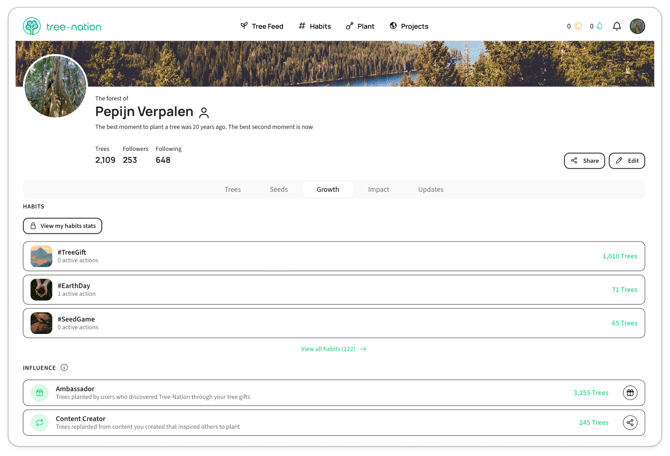
On your forest page, click the Growth tab. The Growth page is split into two sections: Habits and Influence.
🌿 Habits
This section shows the causes and occasions ("habits") you plant for most.
- Your top 3 habits, ranked by number of trees planted. For each one you'll see the habit's name (hashtag), how many active actions are running under it, and how many trees you've planted for it.
- Click anywhere on a habit, or on its hashtag, to open that habit's page.
- Click "View all habits" to expand the list and see every habit you've used — not just your top 3.
- "View my habits stats" — visible only to you, the forest owner — takes you to your full, detailed habit statistics page.
🌍 Influence
This section shows the ripple effect of your own actions on Tree-Nation — trees planted by other people, as a result of something you did.
Your influence shows trees planted by other users as a direct result of your actions on Tree-Nation. A single tree may count toward multiple users' influence when multiple relationships apply.
Two counters make up your Influence section:
- Ambassador — trees planted by users who discovered Tree-Nation through your Tree-Gifts. In other words: everyone who joined because you gifted them a tree, and has gone on to plant themselves, counts here.
- Content Creator — trees replanted from content you created that inspired others to plant. This counts trees that were replanted from an original tree of yours (not the original tree itself).