
🔄 Manage your Offset Citizen or Offset Team plan
You can manage most of your subscription plans directly from your account. To do so:
- Log in to your Tree-Nation account.
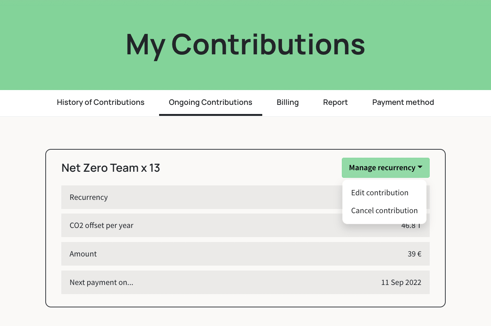
- Go to your “Ongoing Contributions” tab.
- Find the contribution you wish to modify.
For Offset Citizen and Offset Team:
Click "Manage recurrence" — you'll see options to Edit or Cancel your contribution directly.
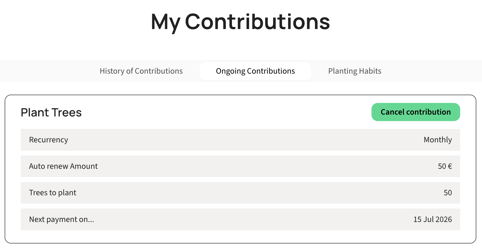
For recurrent monthly or yearly plantings:
There is no Edit option — only "Cancel contribution." To change the amount, frequency, species, or planting initiative, you'll need to:
💡 Tip: You don’t need to delete your account if you want to pause or cancel your contribution. Keeping your account allows you to keep your forest and all trees already planted — and proudly showcase your impact!
⚙️ ProductTrees, Pledge, API, or other integrations
These contributions cannot be edited directly from the Ongoing Contributions tab.
For changes to:
-
ProductTrees
- Pledge
- API and Zapier integration
To manage one of the above contribution, please contact us using one of the following options:
-
✉️ Email: support@tree-nation.com
-
Or reach out to your assigned Account Manager
These plans are linked to integration settings and billing structures that require our team’s help to safely update.
🧩 How to access and review ProductTrees settings
If you are currently using the ProductTrees and want to view or review your integration:
-
Log in to your account.
-
Go to the ProductTrees page.
-
Click “View code” next to your integration.
-
Use the “Customize” tab to adjust:
-
Species package
-
Tree message
-
Language
-
Number of trees planted
-
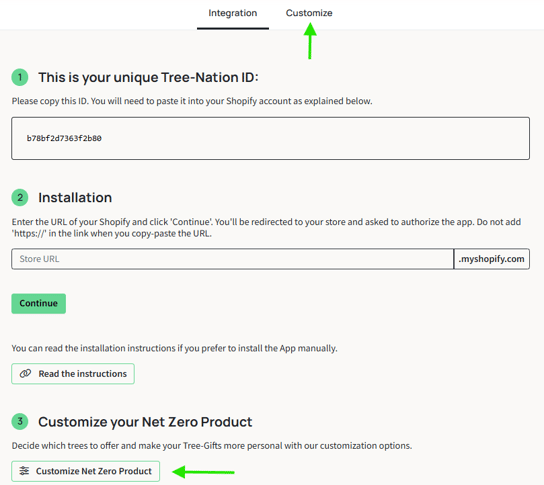
⚠️ Important: This page only allows some limited edits. For core changes (billing, tree logic, etc.), please contact support.
🌱 Want to start another contribution?
You can launch additional tree-planting initiatives at any time.
Explore our available Tree Planting Services and choose what suits your goals.