
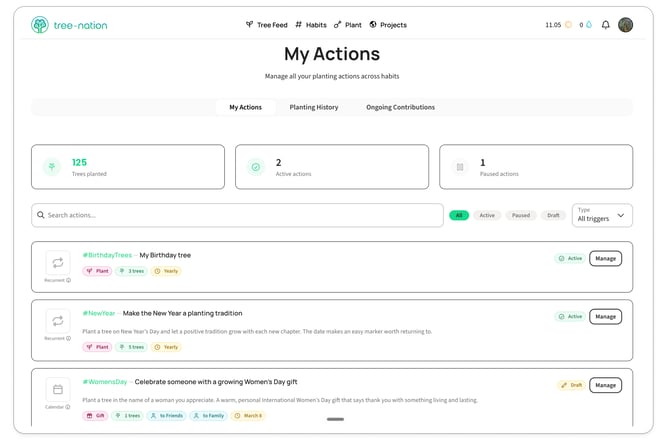
Every planting action you've set up — recurring or one-off, planted or gifted — lives on your My Actions page. From here you can check on them, edit them, and turn them on or off.
Open it from your profile menu — click your account icon in the top-right corner, then My actions — or go straight to tree-nation.com/my-actions.
What you'll see
At the top: how many trees you've planted through your actions, how many are active, and how many are paused.
Below that, every action you've created, each showing:
- Its trigger type — Recurrent (repeats on a schedule, e.g. yearly) or Calendar (tied to a specific date)
- Whether it's Active, Paused, or still a Draft
- Whether it plants for you or gifts to someone else
- How many trees it plants, and how often
Use the search bar, the Active / Paused / Draft filters, or the Type filter to find a specific one quickly. Type filters by what kind of action it is: Campaign, Transactional, On-going, One-time, or Pledge.
Managing an action
Click Manage on any action to open it.
- Active action — click Manage > Edit to change anything (species, quantity, message, timing), or Manage > Pause to stop it without deleting it.
- Paused action — click Resume to pick up right where it left off.
- Draft action — you started setting it up but didn't finish. Open it to keep editing, then either Save draft to finish later or Activate to turn it on.
Inside each action, you can adjust:
- Whether it plants for yourself or gifts trees to others
- The project or species package
- How many trees per planting
- The personal message and image shown on the trees
- The timing — a recurring frequency, or a specific date
Good to know
Pausing an action keeps all its settings — you won't have to rebuild it to start it again.