
Quick access links:
Pay via Card
Pay via PayPal
Pay via Bank Transfer
Advanced Payment terms
Pay via Debit or Credit Card
Easily manage your credit or debit card information for seamless payments:
-
Log in to your account.
-
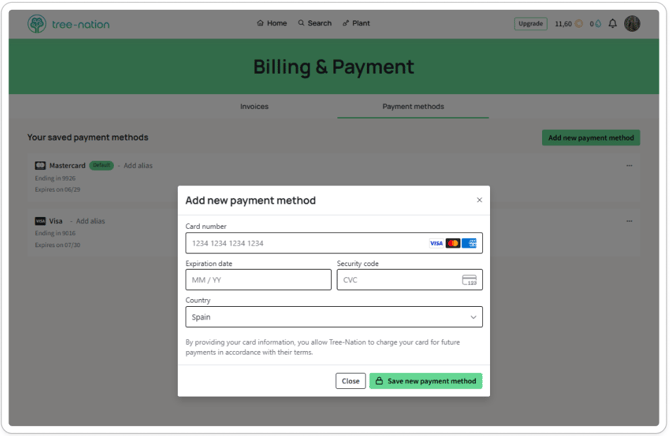
Navigate to Payment Method under the ´Billing & Payment´ section.
-
Add your card details, then click the ´Save new payment method´ button to update your card details.
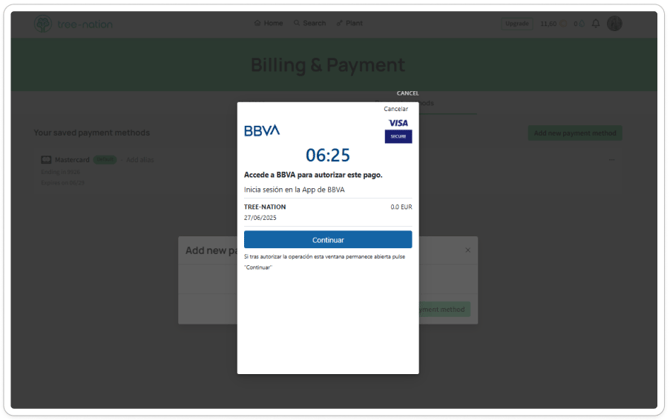
- In most cases, a secure pop-up window will appear requesting you to authorize the card addition via your bank's mobile application (e.g. BBVA, Revolut, etc.). This step is required to validate and save your card successfully. Make sure to complete the authorization in the banking app to finalize the process. See second printscreen as an example.
-
Card payment: Add credits to your account or use your card at checkout when planting trees or activating a plan.
Note: Only Debit Cards with a card number, CVC, and expiry date are a valid payment method.
Pay via PayPal (minimum 25€)
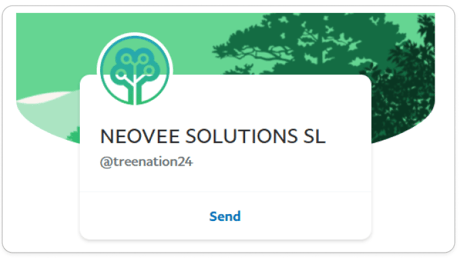
Send funds to Tree-Nation using our PayPal payment link or directly to paypal@tree-nation.com.
-
Include the amount you wish to credit (minimum €25).
-
If your Tree-Nation account email differs from your PayPal email, specify this in the payment notes.
-
Confirm that your account has been credited by checking your email. Processing may take up to one business day.
Pay via Bank Transfer (Minimum €100)
-
Transfer funds using the details below:
Entity Name: Neovee Solutions, S.L.
Bank: CaixaBank, S.A.
IBAN: ES8321001310650200085824
BIC/SWIFT: CAIXESBBXXX -
Include your Tree-Nation account email or forest profile link in the transaction’s concept field.
-
Confirm crediting by checking your email. Processing may take up to one business week.
Important:
-
If you do not receive a confirmation email within one week, contact us via support chat with your name, email, and the transferred amount.
-
The ordering party is responsible for covering any associated bank charges.
Once your account is credited, you will be able to plant trees without requiring any credit card information.
Advanced Payment terms
1. Protection against interruptions with our automated services
To ensure uninterrupted tree requests for IoT (Internet of Trees) or ProductTrees, we include an automated recharge of your credit card.
Each recharge will generate an invoice visible in your account under Invoice.
Please contact your Account Manager if you want to edit the amount of the auto-recharge.
2. Option to Pay at the End of the Month
With this option you will receive an invoice at the end of each month based on the number of trees planted during that month.
This option is available with a Premium Subscription (or accounts with a monthly volume exceeding €200).
Please contact your Account Manager to enable this option.