
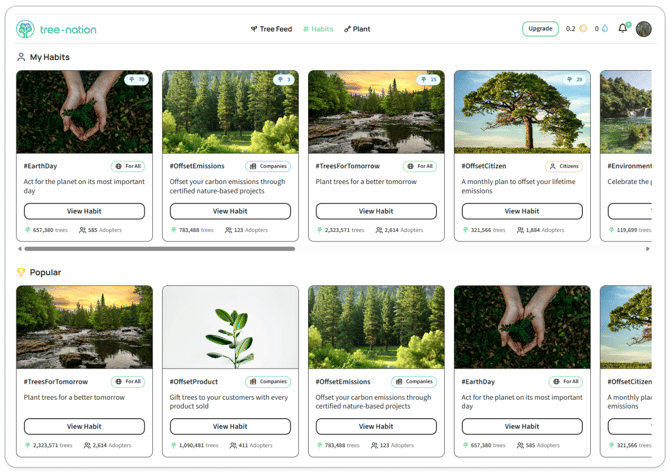
When you open a Planting Habit like #EarthDay or #OffsetTeam, you're stepping into a shared movement — a place where individuals and companies collectively plant trees around a common theme. Each Habit has its own dashboard packed with features designed to track impact, inspire action, and connect you with others working toward the same goal.
This guide walks you through every feature on a Planting Habit page so you can make the most of your participation.
What you see at the top: The Habit Overview
Every Habit page starts with the essentials:
The hashtag title (e.g., #EarthDay) tells you the theme or occasion this Habit represents.
Featured badge appears on Habits that have been reviewed and approved by Tree-Nation. These are high-quality, well-defined Habits aligned with meaningful causes or events.
Trees planted shows the collective total — every tree ever planted under this Habit by all participants combined. This number represents the scale of the movement you're joining.
Adopters counts how many sponsors have contributed. It's a measure of community participation.
Add to wishlist lets you bookmark Habits you want to return to or activate later. Your wishlist keeps them accessible from your main Habits page.
Plant button takes you directly to the planting flow for this Habit. When you're ready to contribute, this is your starting point.
Share button generates a link you can send to colleagues, partners, or friends. Sharing invites others to join the movement and amplifies the Habit's reach.
Overview text explains the purpose of the Habit — why it exists, what occasion or theme it's tied to, and who might want to use it. For example, #EarthDay's overview describes the annual event and why planting trees is one of the most effective actions individuals can take.
Trees Tab: the filtered Tree Feed
The Trees tab shows you the Tree Feed, but filtered to display only trees planted under this specific Habit.
Instead of browsing the entire global feed, you're seeing trees tied to #EarthDay, #OffsetTeam, or whichever Habit you're viewing. Each tree post includes:
- The planter's name and profile
- The personalized message or photo they attached
- How many trees they planted
- Who else they inspired (if the tree was gifted or replanted)
This feed gives you a sense of how others are using the Habit. You'll see companies offsetting events, individuals gifting trees for Earth Day, or teams planting as part of internal campaigns. It's both inspiration and transparency — proof that this movement is real and growing.
How to use it: Browse the feed to understand how others frame their participation. Notice the tone, the occasions, the personalization styles. When it's your turn to plant, you'll have context for what resonates with this community.
Actions Tab: configure your planting action
Note: This feature is launching soon. The Actions tab will become your control center for setting up automated or custom planting tied to this Habit.
Once live, this is where you'll define:
What you're planting — the number of trees and which project they'll support.
Whether it's a tree gift — if you're planting on behalf of someone else (a client, employee, event attendee), you can configure that here.
Personalization — attach a custom image, write a message, or let Tree-Nation auto-generate content that reflects this Habit's theme.
Frequency — decide if this is a one-time action or a recurring commitment. For example:
- One-time: Plant 50 trees for Earth Day 2026.
- Recurring: Plant 10 trees every Earth Day, automatically.
- Ongoing: Plant a tree every time a new customer signs up, tagged with #NewCustomer.
The hashtag is pre-filled based on the Habit you're in, so your trees automatically join the collective movement.
For now, clicking into Actions takes you to the standard planting page. Once the feature launches, you'll have full configurability directly from the Habit dashboard.
Galleries Tab: visual inspiration
The Galleries tab is a library of images curated for this Habit.
These aren't random photos — they're thematic visuals tied to the Habit's purpose. For #EarthDay, you'll find Earth Day-themed graphics, environmental imagery, and branded designs. Each image shows how many trees have been planted using that visual.
Why this exists: Not every planter has a design team. Maybe you're an individual gifting trees to friends, or a small company that wants professional-looking tree posts without hiring a designer. Galleries solve that.
How to use it:
- Browse the Galleries tab to find an image that fits your message.
- Download it or note which one you want to use.
- When you plant your trees, upload that image as your tree's personalization.
Of course, you can always upload your own branded image instead. Galleries are optional inspiration, not a requirement.
Leaderboard Tab: recognition and friendly competition
The Leaderboard ranks everyone who has contributed to this Habit — sorted by the number of trees planted.
You can filter the view:
- All — shows everyone (individuals and companies combined).
- Citizens — shows only individual planters.
- Companies — shows only organizations.
Each entry displays:
- The planter's avatar and name
- Their total tree count for this Habit
- Their rank (1st, 2nd, 3rd, etc.)
Why this matters: Leaderboards create visibility and motivation. If your company is #1 on #OffsetTeam, that's a signal to partners, employees, and prospects that sustainability isn't just talk — it's measurable action. For individuals, it's recognition that your contribution is part of something larger.
Top Contributors sidebar: Throughout the Habit page, you'll see a "Top contributors" box on the right. This is a snapshot of the leaderboard, always visible so you know who's leading the movement. It reinforces that this Habit isn't theoretical — real organizations and people are planting real trees right now.
How to use it: Check the leaderboard before you plant. If you're planning a team initiative or offsetting an event, you'll see which companies are already participating. That context can inform your strategy. And once you've planted, your name appears on the list — a permanent record of your participation.
Voices Tab: community reviews and experiences
The Voices tab is where the community shares how they're using the Habit.
Think of it as a review section, but instead of rating stars, people share stories:
- "One of my favorite events of the year. During Earth Day, I am gifting a tree to everyone within my network."
- "We planted 200 trees for our team retreat under #OffsetTeam. Our employees loved seeing their names in the Tree Feed."
- "I use #NewCustomer to welcome every client. It's become part of our onboarding culture."
Each voice is timestamped and attributed to the person who posted it.
Why this exists: Newcomers to a Habit often wonder, "How do others actually use this?" Voices answer that question. They show real use cases, creative applications, and the emotional resonance of participation. They turn an abstract idea into something concrete and replicable.
How to use it:
- Before planting: Read the Voices tab to understand how others frame their participation. You'll pick up language, timing, and creative angles.
- After planting: Add your own voice. Share your experience, your strategy, or your results. Other planters will read it and gain ideas from you.
Voices build community. When someone reads your post and thinks, "I could do that too," you've just expanded the movement.
Evolution tab: tracking the habit's growth
The Evolution tab tells the story of the Habit's progress — both recent activity and long-term milestones.
Last trees planted:
- Today — how many trees were planted in the last 24 hours.
- This month — cumulative for the current month.
- This year — cumulative for the current calendar year.
These numbers show velocity. A Habit with 500 trees planted today is actively growing. A Habit with 10 trees this year might be dormant or niche.
Planting Habit Rank: Every Habit progresses through a series of ranks based on total trees planted:
- Spark (0 trees) — The starting point. Every Habit begins here.
- Idea (1,000 trees) — The Habit has gained traction.
- Concept (10,000 trees) — Enough momentum to prove it's more than just an idea.
- Movement (100,000 trees) — A true collective effort with broad participation.
- Habit (1,000,000 trees) — Deeply embedded in the community. Recurring and sustainable.
- Tradition (10,000,000 trees) — A defining part of Tree-Nation's culture. Multi-year legacy.
The Evolution tab shows which ranks have been reached (green checkmarks) and which are still ahead. For #EarthDay, you might see that it's currently a Movement (100,000 trees reached) and working toward Habit (1,000,000 trees).
Why this matters: Evolution turns individual plantings into collective progress. When you contribute 50 trees to a Habit at 95,000, you're helping push it over the Movement threshold. That shared milestone is motivating — you're not just planting trees, you're building a Tradition.
Why join an existing Habit instead of creating your own?
You might be tempted to create a unique hashtag for your company or event. That's possible, but here's why joining an existing Habit is often the better choice:
Collective impact is more compelling than isolated action. A Habit with 500,000 trees planted by 200 companies tells a story: "This cause matters to hundreds of organizations." Your 1,000 trees become part of that narrative. If you create #MyCompanyTrees instead, those 1,000 trees stand alone — impressive, but not part of a movement.
Leaderboards and Voices are empty in new Habits. When you join #EarthDay, you immediately see rankings, reviews, and proof that others are participating. That context makes your contribution more meaningful. A brand-new Habit starts with zero — no social proof, no community.
Existing Habits have better discoverability. Habits with thousands of trees rank higher in Tree-Nation's Trending and Popular sections. That means more people will see your participation. If you plant under #OffsetEvents (a Featured Habit with 5,000+ trees), event organizers browsing Habits will find your company. If you plant under #MyUniqueHashtag, no one will discover it unless you actively promote it.
You can still customize your tree posts. Joining a Habit doesn't mean losing your brand. You can upload your own image, write your own message, and add your logo to every tree. The hashtag ties you to the movement; the personalization preserves your identity.
When should you create a new Habit? If there's genuinely no existing Habit that fits your purpose — for example, you're launching a multi-year internal campaign with a specific name — then creating your own makes sense. But first, check if there's already a Habit that aligns. Chances are, there is.
Getting Started: your first habit participation
Ready to plant trees under a Habit? Here's the simplest path:
1. Find the right habit
Go to the main Habits page and browse Trending or Popular. Look for themes that match your initiative:
- Offsetting an event? → #OffsetEvents
- Celebrating Earth Day? → #EarthDay
- Welcoming new customers? → #NewCustomer
- Team-building activity? → #OffsetTeam
Click View Habit to open the dashboard.
2. Understand the community
Check the Leaderboard to see who else is participating. Read the Voices tab to learn how others use this Habit. Browse the Tree Feed to see what tree posts look like.
3. Plant your trees
Click the Plant button at the top. You'll enter the standard planting flow:
- Choose your project (the location where trees will be planted).
- Decide how many trees to plant.
- Personalize your tree (upload an image, write a message, or use a Gallery visual).
- The hashtag is already set to the Habit you're in.
Complete the planting. Your trees are now part of the collective.
4. Share your participation
After planting, your name appears on the Leaderboard. Your tree posts show up in the Tree Feed. Consider:
- Adding a Voice to share your experience.
- Using the Share button to invite colleagues or partners to join.
- Checking the Evolution tab to see if your contribution helped the Habit reach a new rank.
5. Make it recurring (Optional)
If this Habit aligns with an ongoing commitment — monthly offsets, annual events, or per-customer plantings — bookmark it via Add to wishlist. Once the Actions tab launches, you'll be able to automate plantings directly from the Habit dashboard.
FAQ
Can I edit my tree posts after planting? Yes. Go to your Forest, find the tree, and edit the personalization (image or message). The hashtag is locked once planted.
Can I be on multiple Habit leaderboards? Absolutely. If you plant under #EarthDay, #OffsetTeam, and #NewCustomer, you'll appear on all three leaderboards with separate tree counts for each.
What if I want to remove my company from a leaderboard? Leaderboards reflect actual plantings — they're not editable.
Can I see which employees from my company have planted under a Habit? If your team is planting through a shared company account or forest, yes. If individuals are planting from their own accounts, you'll only see their public profiles on the leaderboard.
What happens if a Habit reaches "Tradition" rank? It becomes a permanent part of Tree-Nation's culture. Habits that reach Tradition (10,000,000+ trees) are typically celebrated with special recognition, may be featured in annual impact reports, and often inspire new related Habits.
Can I suggest a new Habit? Yes. If there's a theme or occasion you think deserves a Habit, you can propose it via Tree-Nation's contact form or by adding a Voice to an existing related Habit. High-quality proposals that align with Tree-Nation's mission and have clear use cases are most likely to be approved as Featured Habits.
How often are leaderboards updated? Leaderboards update in near-real-time. When someone plants trees under a Habit, their rank adjusts within minutes.
Can I plant trees under a Habit without it showing publicly? Tree plantings are inherently public on Tree-Nation — that's part of the transparency model. If you need private offsetting, consider using Tree-Nation's B2B dashboard features or contact support for enterprise solutions.
Ready to make an impact?
The Habits dashboard isn't just a tracking tool — it's an invitation to join movements that are already in motion. Every Feature shows you proof: proof that others are participating, proof that your contribution matters, proof that collective action works.
Start by finding a Habit that aligns with your values or goals. Browse the features. See who's already planting. Then add your trees to the movement.
The leaderboard, the Evolution rank, the Voices — they're all waiting for you.
Still learning the basics?
If you're new to Planting Habits and want to understand the core concepts first — what a Habit is, what an Action is, and why both exist — start with our foundational guide:
What are Planting Habits & Actions? →
That article explains the framework. This one shows you how to use it.